You’re listening to an amazing song when you quickly grab your phone to Shazam it, but the app returns nothing. This frustrating moment happens more often than you’d think, especially with newer tracks, live performances, or songs with poor audio quality.
When Shazam fails to identify music, you can try alternative music recognition tools like TrackSniff, apps like SoundHound or Musixmatch, search for lyrics online, or ask music communities on Reddit and social media for help. These methods often succeed where Shazam falls short because they use different databases and recognition technology.
Don’t let Shazam’s inability to find certain songs stop you from discovering new music. There are proven ways to identify even the most elusive tracks that will expand your music library beyond what mainstream apps can offer.
Key Takeaways
- Alternative music recognition apps and manual search methods can identify songs that Shazam misses
- Online communities and social media platforms provide helpful resources for finding unknown tracks
- Multiple identification tools and techniques increase your chances of discovering any song
1. Use TrackSniff for Complete Track IDs
TrackSniff creates full timestamped tracklists from entire DJ mixes and long-form content where traditional apps fail. The platform handles complex audio sources and provides exportable results with confidence scoring for each identified track.
Full Tracklist Generation
TrackSniff analyzes entire DJ sets unlike Shazam to identify every track played, not just individual songs. This automated approach saves hours of manual identification work.
The AI scans through complete mixes and breaks down each track transition. You get a comprehensive list of all songs played during the set. This works especially well for DJ sets that combine multiple tracks seamlessly.

Key features include:
- Complete track identification from start to finish
- Recognition of overlapping and blended tracks
- Support for various music genres and styles
The system handles complex mixing techniques like crossfading and beatmatching. Traditional apps struggle with these elements, but TrackSniff processes them effectively.
Timestamps for Each Track
Every identified track comes with precise start and end timestamps. This feature eliminates guesswork about when specific songs begin and end in long mixes.
You can jump directly to any track within the mix using these timestamps. The precision helps DJs study mixing techniques and transitions between songs.
Timestamp benefits:
- Exact track positioning within mixes
- Easy navigation to specific songs
- Perfect for creating chapters or segments
The timestamps work across different audio qualities and recording conditions. Even when tracks blend heavily, the system maintains accurate timing information.
DJ Mix Support
The platform specializes in DJ mixes where tracks overlap and blend together. Standard identification tools fail with these complex audio patterns.
TrackSniff recognizes layered elements, vocal samples, and instrumental breaks within DJ performances. The AI handles track identification even when multiple songs play simultaneously.
DJ-specific features:
- Handles beatmatching and key changes
- Identifies tracks through effects and filters
- Recognizes remixes and edits
Live DJ sets present unique challenges with crowd noise and venue acoustics. The system accounts for these variables during processing.
YouTube, Mixcloud & SoundCloud Links
You can submit direct links from major streaming platforms without downloading files. The system processes content directly from YouTube, Mixcloud, and SoundCloud URLs.
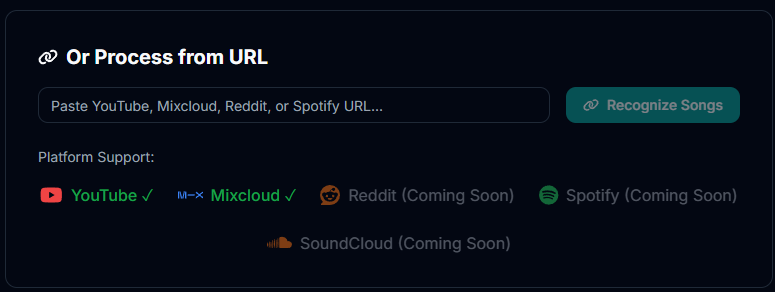
Simply paste the link and let TrackSniff handle the rest. This streamlined approach works faster than downloading and uploading large audio files.
Supported platforms:
- YouTube videos and livestreams
- Mixcloud DJ mixes and radio shows
- SoundCloud tracks and playlists
File size limits don’t apply when using direct links. The system processes content regardless of length or audio quality from these platforms.
Tracklist Export & History
All identified tracks export to various formats for easy sharing and archiving. You can download tracklists as text files, spreadsheets, or formatted documents (pro and elite users get more export options).
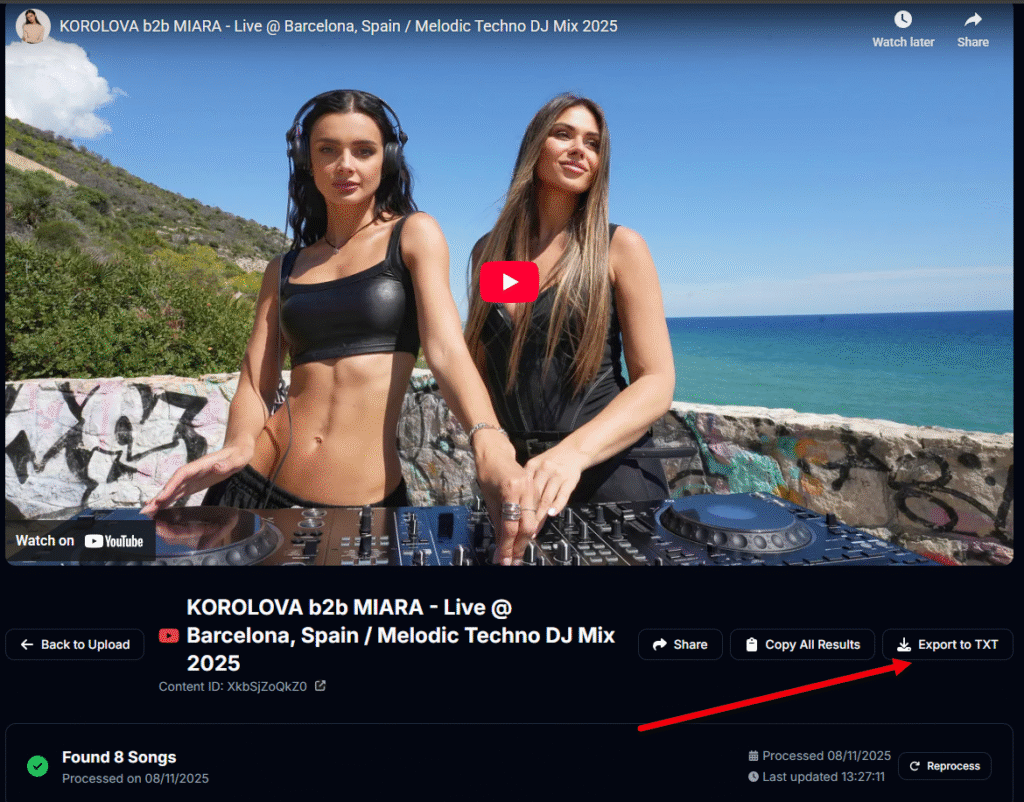
Export options include:
- Plain text tracklists
- CSV files for spreadsheets
- Formatted track information
Your identification history saves automatically for future reference. This feature helps build a personal database of analyzed mixes and their contents.

The history feature tracks processing dates, confidence scores, and source links. You can revisit previous identifications and update results as the AI improves.
2. Alternative Music Recognition Apps and Tools
Several proven alternatives can identify songs when Shazam fails, including SoundHound’s advanced voice recognition technology, built-in assistant services on smartphones, and specialized apps like Genius that combine song identification with detailed lyric analysis.
Try Soundhound for Song Identification
SoundHound stands out another top Shazam alternative for music recognition. This app offers unique features that Shazam lacks.
Key SoundHound Features:
- Voice recognition: You can hum or sing melodies to identify songs
- Real-time lyrics: LiveLyrics display as songs play
- Voice assistant: Say “Hey SoundHound” to control the app hands-free
The orange button interface makes song identification simple. Tap it and let the app listen for a few seconds.
SoundHound connects directly to Spotify and YouTube for instant playback. You can save discovered songs and build playlists within the app.
The app works well in noisy environments where Shazam struggles. Its database covers multiple genres and includes both popular and obscure tracks.
Use Google Assistant or Similar Services
Built-in smartphone assistants provide reliable music identification without downloading extra apps. Google Assistant and Siri both recognize songs effectively.
Google Assistant Method:
- Say “Hey Google, what song is this?”
- Hold your phone near the audio source
- Get instant results with artist and title information
Siri Method:
- Say “Hey Siri, what’s playing?”
- Wait for the app to listen and process
- View song details and streaming options
These services work offline in some cases. They integrate with your existing music apps and purchasing preferences.
Voice assistants often succeed when dedicated music apps fail. They use different recognition algorithms and databases than traditional music recognition apps.
Explore Genius and Other Music Recognition Apps
Multiple music recognition alternatives offer specialized features beyond basic song identification. Each app brings unique strengths to music discovery.
Top Alternative Options:
| App | Key Feature | Downloads |
|---|---|---|
| Genius | Lyric annotations and artist interviews | 5+ million |
| Musixmatch | World’s largest lyric database | 50+ million |
| MusicID | Artist biographies and movie soundtracks | 1+ million |
Genius provides song identification plus detailed background information. You can read fan annotations about lyrics and watch artist interviews about specific tracks.
Musixmatch excels at finding lyrics in multiple languages. The app translates lyrics and offers karaoke features with real-time text display.
Music Identification uses Gracenote’s extensive database for accurate results across all genres. The app displays cover art and detailed song information instantly.
These music recognition apps often identify songs that Shazam misses. Try multiple apps for the best chance of success.
3. Manual and Community-Based Song Identification Methods
When automated music recognition apps fail you, turning to human expertise and manual search techniques often yields better results. Online communities and specialized tools can identify obscure tracks that even the most advanced algorithms miss.
Ask on Music Forums and Subreddits
Reddit communities like r/tipofmytongue and r/NameThatSong have thousands of music enthusiasts ready to help. These dedicated communities where users help identify songs often succeed where Shazam and SoundHound fail.
Post a detailed description including:
- Genre or style (rock, electronic, classical)
- Time period when you heard it
- Lyrics fragments you remember
- Where you heard it (movie, commercial, radio)
- Vocal characteristics (male/female, accent, tone)
Include audio clips if possible. Record yourself humming the melody or capture the original audio source. Many users can identify songs from just a few seconds of audio.
Music forums like WatZatSong specialize specifically in song identification. This particular platform has experienced members who know obscure tracks across all genres and decades.
Contact Content Creators for Song Information
YouTube creators, TikTok users, and Instagram influencers often respond to direct messages about music in their content. Many content creators list their music sources in video descriptions or pinned comments.
Check the comments section first. Other viewers frequently ask about background music, and creators sometimes reply with track information.
For podcasts and radio shows, email the producers directly. Most shows keep detailed logs of all music played during broadcasts.
Contact the production companies behind commercials or TV shows through their official websites. They maintain records of all licensed music used in their content.
Leverage Song Identification Bots and Online Tools
AHA Music offers online song identification that works better than Shazam for many users, although you can only upload audio files directly for analysis.
Discord music bots can identify songs playing in voice channels. Popular bots like MEE6 and Hydra include music recognition features that work with live audio streams.
Try multiple recognition apps beyond Shazam:
- SoundHound – Better for humming recognition
- Musixmatch – Strong with lyrics identification
- Google Assistant – “What song is this?” voice command
Another handy method is to upload unlisted YouTube videos containing the mystery track. YouTube’s Content ID system often identifies copyrighted music automatically, displaying the song information in the video details.
Try TrackSniff Free
We offer a powerful alternative when Shazam fails to identify tracks in DJ mixes and long-form content. Our specialized tool excels at recognizing music in complex audio environments.
Key advantages over traditional music recognition apps:
- Automatically creates complete tracklists with precise timestamps
- Works with YouTube, SoundCloud, and Mixcloud links
- Uses multiple databases to verify song matches
- Provides confidence scores for each identification
Perfect for challenging audio formats:
- DJ sets and live mixes
- YouTube music compilations
- Livestream recordings
- Multi-layered audio content
You can export your identified tracks and build playlists from discovered music. Our platform combines database searches with community input to improve accuracy.
TrackSniff works best when you need to:
| Feature | Benefit |
|---|---|
| Full tracklists | Get every song from a mix, not just one |
| Timestamp data | Know exactly when each track plays |
| Export options | Save results for later use |
| Confidence ratings | Trust the accuracy before sharing |
Our service handles audio that stumps standard recognition tools. You get detailed results instead of basic song titles.
So, what are you waiting for?

- Reddit Track ID Alternatives: Top Options & Community Insights - November 28, 2025
- How to Find Tracks Used by DJs on SoundCloud: Complete Guide - November 28, 2025
- TrackSniff Adds SoundCloud Support - November 28, 2025