Finding the tracklist from your favorite DJ set can feel impossible when you hear amazing tracks but don’t know their names. Whether you discovered an incredible mix on SoundCloud, watched a festival livestream, or heard something at a club, identifying those perfect tracks is crucial for building your own music collection.
You can find DJ set tracklists using automated tools like TrackSniff, manual identification through apps like Shazam, or by checking existing databases like 1001Tracklists or MixesDB. These methods work across different platforms and file types, giving you multiple ways to discover the music you love.
The key is knowing which approach works best for your situation. Some tools excel at analyzing audio files you upload, while others work better for live identification or searching existing crowd-sourced databases.
Key Takeaways
- Use automated analysis tools (like TrackSniff!) to extract complete tracklists from uploaded DJ set files
- Check existing tracklist databases before trying to identify tracks manually
- Combine multiple identification methods for the best results when finding unknown tracks
Popular Platforms Featuring DJ Set Tracklists
Several major platforms specialize in collecting and organizing tracklists from DJ sets across all genres including house music. These sites offer different features like user submissions, automated detection, and comprehensive archives that make finding specific tracks much easier.
1. 1001Tracklists Overview
1001Tracklists serves as the world’s leading DJ tracklist database with an extensive collection spanning multiple genres. The platform covers everything from underground house sets to major festival performances.
You can search by DJ name, event, or specific track to find complete setlists. The site includes both user-submitted tracklists and verified entries from artists themselves.
Key Features:
- Full recordings of sets when available
- Links to where you can find complete mixes
- Genre filtering for house, techno, trance, and more
- Mobile-friendly interface
The database covers major electronic music events, underground club nights, and podcast series. Many entries include the full recording of the original set alongside the tracklist.
Database Benefits:
- Genre filtering – Browse by specific house music subgenres
- Purchase links – Direct connections to music stores and streaming services
- Event coverage – Tracklists from major festivals and club events
- Historical data – Access to years of archived DJ performances
Most tracklists include timestamps showing when each track plays during the set. This helps you jump to specific moments in longer DJ performances.
The platform also shows track IDs and unreleased music that DJs often play. You’ll find both mainstream releases and exclusive edits that aren’t available elsewhere.
2. MixesDB for Tracklist Archives
MixesDB focuses specifically on DJ set tracklists and offers various tracklist generation tools.
The site maintains detailed archives of electronic music sets with user-contributed content.
Manual Methods for Identifying Tracks
Manual track identification relies on community knowledge and human expertise rather than automated tools. These methods work well when AI tools fail and often provide accurate results through collective effort.
1. Using Community Forums and Reddit
Reddit offers several dedicated communities for track identification. The r/trackid and r/mixes subreddits contain experienced users who specialize in identifying tracks from DJ sets.
Post your audio clip or set link with specific details. Include the timestamp of the track you need identified. Mention the genre, event name, and DJ if known.
Key subreddits for track identification:
- r/tipofmytongue
- r/NameThatSong
- r/tracklist
- r/Beatmatch
Users often respond within hours. Provide clear audio quality for better results. Thank contributors when they help you find tracks.
2. Leveraging Social Media Groups
Facebook groups dedicated to specific genres have knowledgeable members. Search for groups related to house, techno, trance, or your preferred style.
Twitter works well for real-time identification during live streams. Tag DJs directly or use hashtags related to the event. Many DJs respond to track ID requests on social platforms.
Discord servers for electronic music communities offer instant chat support. Members share their knowledge quickly in dedicated track ID channels.
Popular platforms for track identification:
- Facebook genre-specific groups
- Twitter with event hashtags
- Discord music servers
- Instagram DJ comment sections
3. Crowdsourcing Track IDs at Events
Ask fellow attendees during live events. Other music fans often recognize tracks immediately. Exchange contact information to share discoveries later.
Film short video clips of tracks you want to identify. Capture clear audio without too much crowd noise. Post these clips in event-specific social media groups afterward.
Connect with other attendees through event apps or Facebook groups. Many festivals have dedicated pages where fans share track lists and discuss sets.
Event-based identification strategies:
- Network with other music enthusiasts
- Record clear audio samples
- Join event-specific online communities
- Ask venue staff or photographers
Automated Track Identification Tools
Modern audio recognition technology can identify tracks in DJ sets within minutes. These tools use audio fingerprinting to match songs against massive music databases, making tracklist creation much faster than manual identification.
1. Audio Recognition Services
Several powerful services can identify tracks from DJ sets automatically. ACRCloud and AudD provide API access for programmatic track recognition, though both require paid accounts.
Shazam works well for identifying individual tracks but struggles with mixed audio. The app performs better when tracks have clear vocals or distinctive elements.
SoundHound offers similar capabilities to Shazam. It can identify songs even when they’re heavily mixed or have effects applied.
Professional services like ACRCloud deliver higher accuracy rates for DJ mixes. They’re designed specifically for continuous audio streams rather than individual song identification.
These services work by creating audio fingerprints from your mix. They then compare these fingerprints against millions of songs in their databases.
2. DJ Set Analyzer Platforms
Specialized platforms make track identification simple for DJs and music fans. DJ Set Analyzer is a free online tool that analyzes MP3, WAV, and FLAC files to extract complete tracklists.
Unfortunately, it’s not very good!

Set79 focuses specifically on SoundCloud DJ sets with timestamps and track details. In theory, this makes it perfect for analyzing house music sets uploaded to the platform.
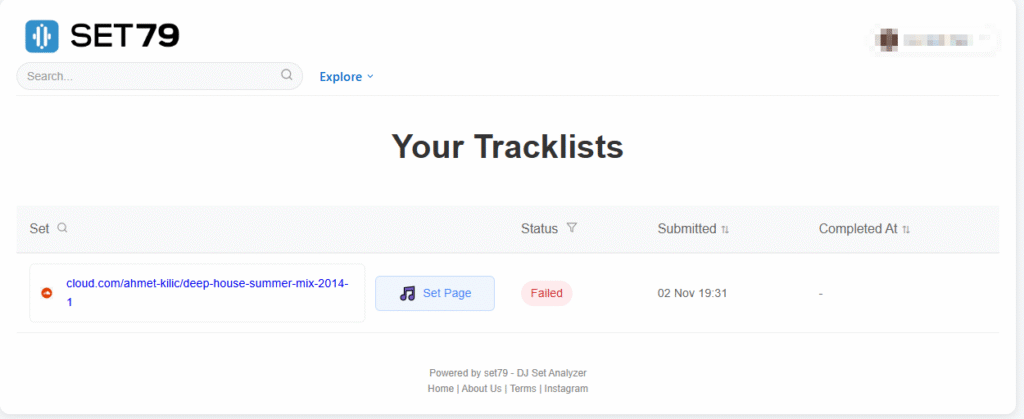
When we tried it ourselves, Set79 failed to live up to the expectations. Their free tier takes a staggering 4 days to deliver a tracklist! Can you believe that? In 2025!
The recognition system behind the platform also doesn’t appear to be very robust, as it couldn’t handle a mainstream mix that we tested with.
Here’s the disappointing proof of that:
We’ve got our own SoundCloud support that you can try out.
How to Use Audio Recognition for Tracklists
Audio recognition tools scan DJ sets and identify individual tracks automatically using databases like Shazam and ACRCloud. These tools accept various audio formats and provide timestamped results with different accuracy levels depending on audio quality and mixing techniques.
Recording and Uploading DJ Sets
Most DJ set analyzers accept audio from multiple sources. You can upload recorded files directly or paste links from streaming platforms.
Direct Upload Options:
- Local audio files from your computer
- Live recordings from club events
- Radio show recordings
- Festival set recordings
Streaming Platform Integration: Popular platforms include YouTube, SoundCloud, and Mixcloud. For example, TrackSniff lets you paste YouTube URLs directly.

File Size Limits: Most free tools have upload restrictions. We currently limit uploads to 100MB for audio files, although we may decide to increase the upload limit for pro and elite subscribers in the future.
Supported Audio Formats
Audio recognition services work with common digital formats. The quality of your audio file affects identification accuracy.
Standard Formats:
| Format | Quality | Recognition Rate |
|---|---|---|
| MP3 | Good | High |
| WAV | Excellent | Very High |
| FLAC | Excellent | Very High |
| M4A | Good | High |
Quality Requirements: Higher bitrate files produce better results. Files recorded at 320kbps MP3 or higher work best for track identification.
Compressed formats like low-quality MP3s may reduce accuracy. Live recordings with crowd noise or poor audio quality create challenges for recognition software.
Processing Time: File format affects how quickly tools process your DJ sets. WAV and FLAC files may take longer to upload but provide more accurate results.
Analyzing Results and Accuracy
Recognition accuracy varies based on several factors. Clean audio with minimal effects produces the best identification rates.
Factors Affecting Accuracy:
- Audio quality and bitrate
- Background noise levels
- DJ mixing techniques used
- Track popularity in databases
Understanding Results: Most tools provide timestamps showing when each track starts. Some services (like ourselves!) offer confidence scores indicating how certain the identification is.
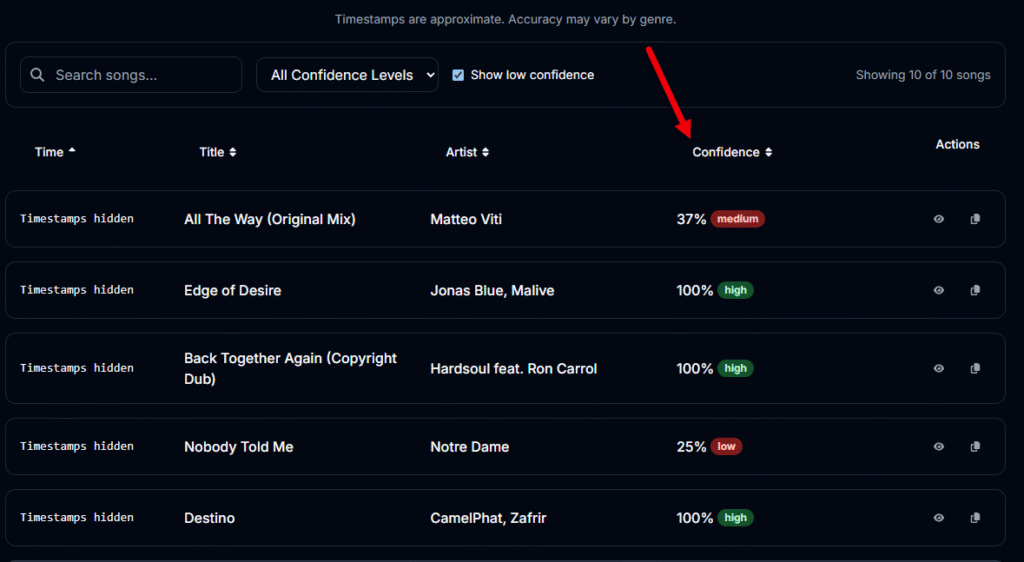
Common Issues: Heavily mixed or remixed tracks may not identify correctly. Tracks with extensive effects or filtering can confuse recognition software.
Underground or unreleased tracks often fail to identify since they’re not in commercial databases. Mashups and edits typically show as the most recognizable track only.
Improving Results: Upload the highest quality audio available. Clean recordings without crowd noise work better than live venue recordings with ambient sound.
Use TrackSniff – Our Specialized Tracklist Tool for House and Electronic Genres
House music and electronic genres require specialized tools that understand the unique characteristics of these musical styles. Our bespoke tool – TrackSniff – offers better recognition rates and more accurate results for electronic music compared to general-purpose track identification services.
Our top features include:
- Extended mix recognition – Identifies tracks even when heavily mixed or edited
- Timestamp accuracy – Shows exact timing for each track transition
- Format flexibility – Supports various audio file types and streaming platforms
With TrackSniff, finding tracklists from DJ sets no longer requires hours of manual work. Our tool has made this process simple and fast.
The process is now straightforward:
- Paste a video URL from YouTube, SoundCloud, or Mixcloud
- Wait a few minutes for processing
- Get complete track information with timestamps
Our bespoke algorithm can detect where each song starts and ends. This works even when DJs use complex mixing techniques. The automatic detection technology does the heavy lifting for you.
You get detailed information for every track:
- Artist names
- Song titles
- Exact start times
- End timestamps
- Additional metadata
This saves you from listening to entire sets multiple times. You don’t need to guess track names or search through music databases manually.
And it’s perfect for different uses, such as:
- Building playlists from your favorite sets
- Cataloging your music collection
- Creating content for social media
- Discovering new artists and songs
The technology works with most popular platforms where DJs share their mixes. You can process sets from live streams, recorded performances, and uploaded content.
TrackSniff has changed how music fans interact with DJ sets. What used to take hours now happens in minutes. You can focus on enjoying the music instead of identifying every single track.
Sign up and try it out for free today!

- Reddit Track ID Alternatives: Top Options & Community Insights - November 28, 2025
- How to Find Tracks Used by DJs on SoundCloud: Complete Guide - November 28, 2025
- TrackSniff Adds SoundCloud Support - November 28, 2025