When you hear an amazing track in a SoundCloud DJ set but don’t know what it is, finding that song can feel impossible. Many music fans spend hours trying to identify tracks manually or asking in comments with no success.
You can find tracks used by DJs on SoundCloud through automated tools like TrackSniff, existing databases like 1001Tracklists, or manual methods including Shazam and community forums. These approaches work for different situations, whether you’re analyzing an entire mix or trying to identify just one song.
The key is knowing which method works best for your needs. Some tools can analyze complete DJ sets automatically, while others help you identify individual tracks as they play. Each approach has strengths depending on the audio quality and mixing style.
Key Takeaways
- Automated tools provide the fastest way to identify multiple tracks from SoundCloud DJ sets
- SoundCloud’s built-in features and external databases offer manual identification options
- Specialized DJ set analyzers deliver better results than general music recognition apps
Essential Methods for Identifying Tracks in DJ Sets
Several proven techniques can help identify tracks from SoundCloud DJ sets, ranging from automated tools that analyze audio fingerprints to manual detective work through social media platforms. The most effective approach combines multiple methods for maximum success.
1. Inputting SoundCloud URLs into TrackSniff
TrackSniff specializes in electronic music recognition and works directly with SoundCloud links. Users paste the DJ set URL into the platform and receive timestamped tracklists within minutes.
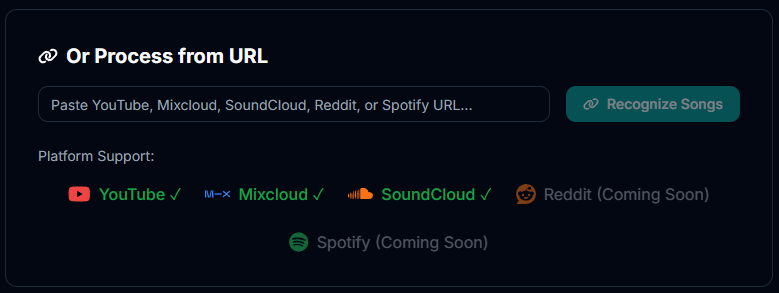
The tool identifies tracks even when heavily mixed or remixed. It handles complex transitions and overlapping songs that confuse other recognition services.

Key features include:
- Automatic timestamp detection
- Support for extended mixes
- Electronic music database optimization
- Direct SoundCloud integration
TrackSniff processes both uploaded DJ sets and live recordings. The platform works best with high-quality audio files and mainstream electronic tracks.
Users get detailed information for each identified song. This includes artist names, track titles, and exact start times for every transition.
2. Using Audio Recognition Tools
Multiple audio recognition services can identify tracks from DJ sets automatically. Shazam works well for individual tracks but struggles with mixed audio, while professional services like ACRCloud handle continuous streams better.
These tools create audio fingerprints from DJ mixes. They compare these fingerprints against millions of songs in their databases.
Popular recognition options:
| Tool | Best For | Accuracy |
|---|---|---|
| Shazam | Single tracks | Medium |
| SoundHound | Vocal tracks | Medium |
| ACRCloud | Full sets | High |
Audio quality affects recognition success rates. Clean recordings at 320kbps or higher produce better results than low-quality files with background noise.
Underground tracks and unreleased remixes often fail to identify. These songs typically don’t exist in commercial recognition databases.
3. Tracklist Databases and DJ Set Analyzers
1001Tracklists serves as the world’s leading DJ tracklist database with extensive collections spanning multiple genres. The platform includes user-submitted tracklists and verified entries from artists themselves.
Users can search by DJ name, event, or specific track. Many entries include timestamps and links to purchase or stream identified songs.
DJ Set Analyzer platforms offer automated analysis of uploaded audio files. These services accept MP3, WAV, and FLAC formats for processing.
Database advantages:
- Pre-existing tracklists save identification time
- Community verification improves accuracy
- Historical archives cover years of performances
- Genre filtering helps narrow searches
MixesDB focuses specifically on electronic music tracklists. The platform maintains detailed archives with user-contributed content and various generation tools.
4. Manually Tracing DJ Likes and Reposts
SoundCloud’s social features provide direct clues about tracks DJs play in their sets. Many artists like or repost songs before including them in playlists or live performances.
Check the DJ’s liked tracks chronologically around the set’s upload date. Recent likes often indicate songs featured in upcoming or recent mixes.
Manual investigation steps:
- Review DJ’s recent activity feed
- Check liked tracks from relevant time periods
- Examine reposted content for set material
- Follow connected artist profiles
Reposts reveal collaborative relationships between DJs. Artists frequently share tracks they plan to feature in future sets or remixes.
Comment sections under DJ sets contain valuable identification help. Other listeners often request track IDs or share their own discoveries in real-time discussions.
Leveraging SoundCloud Features and External Tools
SoundCloud’s advanced search capabilities combined with specialized platforms can help identify specific tracks DJs use in their sets. Remix versions and alternate edits often appear exclusively on SoundCloud, making platform-specific tools essential for comprehensive track discovery.
Advanced Search and Filtering Techniques
SoundCloud’s search function offers powerful filters that help narrow down DJ tracks effectively. Users can filter by genre, duration, upload date, and track type to locate specific versions.
The platform allows searches within specific user profiles and playlists. This feature proves valuable when tracking down tracks from known DJs or record labels. Typing “genre” or “duration:>5min” refines results significantly.
SoundCloud’s search functionality includes options to sort by relevance, newest, or most popular. The “Discover” section highlights trending tracks within specific genres that DJs frequently use.
Key Search Operators:
- Use quotation marks for exact phrase matching
- Add minus signs to exclude unwanted terms
- Filter by upload timeframe to find recent releases
- Search within specific user accounts or labels
Utilizing Dedicated Track Identification Platforms
Specialized tools extract detailed track information from SoundCloud more efficiently than manual searching. Professional SoundCloud scrapers can collect comprehensive track data including titles, artists, and metadata from search results.
Analytics platforms track SoundCloud performance and provide insights into popular tracks across different DJ sets. These tools monitor streaming data, favorites, and chart positions in real-time.
Third-party applications integrate with DJ software to identify tracks playing in mixes. Many of these services cross-reference SoundCloud databases with other music platforms for complete track identification.
Popular External Tools:
- Shazam for live track identification
- Beatport Link for DJ software integration
- 1001Tracklists for setlist databases
- WhoSampled for remix and sample tracking
Exploring Remix and Edit Versions
SoundCloud hosts exclusive remixes and edits that DJs use but aren’t available on commercial streaming platforms. Many producers upload extended mixes, bootlegs, and unofficial remixes only to SoundCloud.
DJ-specific versions often feature extended intros, outros, or breakdowns designed for mixing. These tracks typically appear in specialized playlists curated by DJs or record labels focusing on club-ready versions.
Search terms like “edit,” “remix,” “extended,” or “club mix” help locate these versions. Many DJs create private playlists containing their exclusive edits and remixes for live performances.
Finding Exclusive Versions:
- Check DJ profiles for private or unlisted tracks
- Follow remix-focused labels and collectives
- Search for terms like “VIP,” “dub,” or “bootleg”
- Monitor comments sections for download links
Why TrackSniff is the Best Option for Finding Songs from SoundCloud
TrackSniff stands out as the most effective solution for identifying tracks from SoundCloud DJ sets. The platform uses advanced AI technology specifically designed for electronic music recognition.
Key advantages include:
- Fast processing – Results delivered in minutes, not days
- High accuracy – Built for electronic music genres
- Multiple formats – Accepts audio files and streaming links
- Detailed timestamps – Shows exact track start and end times
Unlike general music apps like Shazam, TrackSniff handles heavily mixed tracks with ease. The tool recognizes songs even when DJs apply effects or complex transitions.
| Feature | TrackSniff | Shazam | Set79 |
|---|---|---|---|
| Processing Time | Minutes | Instant (single tracks) | 4 days |
| Mixed Audio | Excellent | Poor | Limited |
| Electronic Music Focus | Yes | No | Yes |
The platform currently supports YouTube and Mixcloud links with SoundCloud integration also now available. Users can upload audio files up to 100MB for analysis.
TrackSniff provides complete track information including artist names, song titles, and precise timing data. This eliminates the need to manually search through entire DJ sets.
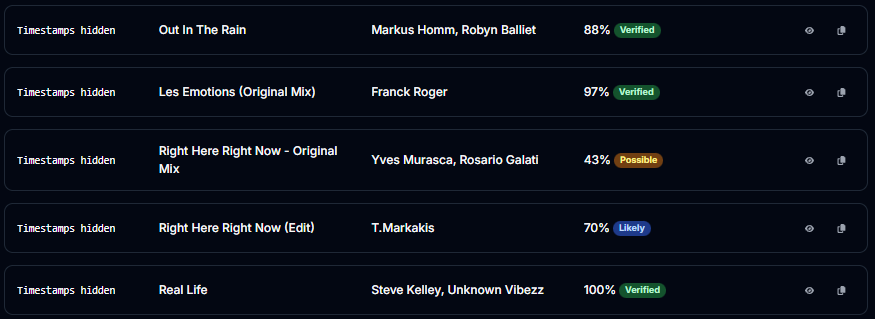
The tool works particularly well for house, techno, and other electronic genres. Its specialized algorithm understands the unique mixing techniques common in these styles.
Users get accurate results without waiting days for processing. The free tier offers generous features for casual users and music fans.

- Reddit Track ID Alternatives: Top Options & Community Insights - November 28, 2025
- How to Find Tracks Used by DJs on SoundCloud: Complete Guide - November 28, 2025
- TrackSniff Adds SoundCloud Support - November 28, 2025